


Un JSON Web Token es un estandar abierto para la creación de Token de Acceso el cual permite firmar digitalmente información en un string para posteriormente validar en este los privilegios e identidad de un usuario en un sistema.
Existen muchas librerías en varios lenguajes para la generación de estos Tokens, una opción para el lenguaje Java es JJWT (Java JWT) el cual es una biblioteca que pretende simplificar la generación y verificación de estos JSON Web Token.
JJWT es una implementación pura de Java basada exclusivamente en las especificaciones JWT, JWS, JWE, JWK y JWA RFC. JWT es de código abierto bajo los términos de la licencia Apache 2.0.
JJWT tiene soporte para la creación, análisis y verificación de JWT compactos firmados digitalmente (también conocidos como JWS) con todos los algoritmos JWS estándar:
Instalación
Maven:
<dependency>
    <groupId>io.jsonwebtoken</groupId>
    <artifactId>jjwt-api</artifactId>
    <version>0.10.5</version>
</dependency>
<dependency>
    <groupId>io.jsonwebtoken</groupId>
    <artifactId>jjwt-impl</artifactId>
    <version>0.10.5</version>
    <scope>runtime</scope>
</dependency>
<dependency>
    <groupId>io.jsonwebtoken</groupId>
    <artifactId>jjwt-jackson</artifactId>
    <version>0.10.5</version>
    <scope>runtime</scope>
</dependency>
<!-- Uncomment this next dependency if you want to use RSASSA-PSS (PS256, PS384, PS512) algorithms:
<dependency>
    <groupId>org.bouncycastle</groupId>
    <artifactId>bcprov-jdk15on</artifactId>
    <version>1.60</version>
    <scope>runtime</scope>
</dependency>
-->
Gradle:
dependencies {
    compile 'io.jsonwebtoken:jjwt-api:0.10.5'
    runtime 'io.jsonwebtoken:jjwt-impl:0.10.5',
            // Uncomment the next line if you want to use RSASSA-PSS (PS256, PS384, PS512) algorithms:
            //'org.bouncycastle:bcprov-jdk15on:1.60',
            'io.jsonwebtoken:jjwt-jackson:0.10.5'
}
Proyectos en Android:
Dependencias:
dependencies {
    api 'io.jsonwebtoken:jjwt-api:0.10.5'
    runtimeOnly 'io.jsonwebtoken:jjwt-impl:0.10.5'
    runtimeOnly('io.jsonwebtoken:jjwt-orgjson:0.10.5') {
        exclude group: 'org.json', module: 'json' //provided by Android natively
    }
    // Uncomment the next line if you want to use RSASSA-PSS (PS256, PS384, PS512) algorithms:
    //runtimeOnly 'org.bouncycastle:bcprov-jdk15on:1.60'
}
Proguard:
-keepattributes InnerClasses

-keep class io.jsonwebtoken.** { *; }
-keepnames class io.jsonwebtoken.* { *; }
-keepnames interface io.jsonwebtoken.* { *; }

-keep class org.bouncycastle.** { *; }
-keepnames class org.bouncycastle.** { *; }
-dontwarn org.bouncycastle.**
Ejemplo en Android
import android.support.v7.app.AppCompatActivity;
import android.os.Bundle;
import android.util.Log;

import java.security.Key;
import java.util.Date;
import java.util.HashMap;
import java.util.Map;

import javax.crypto.spec.SecretKeySpec;

import io.jsonwebtoken.Claims;
import io.jsonwebtoken.Jwts;
import io.jsonwebtoken.SignatureAlgorithm;

public class MainActivity extends AppCompatActivity {

    private String SECRET = "DelapatriaelaltonombreengloriosoesplendorconservemosyensusarasdenuevojuremosmMorirantesqueesclavosvivir";

    @Override
    protected void onCreate(Bundle savedInstanceState) {
        super.onCreate(savedInstanceState);
        setContentView(R.layout.activity_main);

        //Generacion de JSOn Web Token
        String jwt = crearJWT("mouse","JC", "cliente",300000);
        Log.d("JWT", jwt);

        leerJWT(jwt);
    }

    private void leerJWT(String jwt){
        Key key = new SecretKeySpec(SECRET.getBytes(), SignatureAlgorithm.HS512.getJcaName());
        Claims claims = Jwts.parser().setSigningKey(key).parseClaimsJws(jwt).getBody();
        Log.d("JWT", "Subject: " + claims.getSubject());
        Log.d("JWT", "Issuer: " + claims.getIssuer());
        Log.d("JWT", "Level: " + claims.get("lvl"));
        Log.d("JWT", "Exp: " + claims.getExpiration());
    }

    /**
     * @param issuer Proveedor que emitio el JWT
     * @param subject Usuario en nombre del cual fue emitido el JWT
     * @param level Nivel del usuario
     * @param ttlMillis Tiempo de vida del token en milisegundos
     * @return String JWT
     */
    public String crearJWT(String issuer, String subject, String level, long ttlMillis) {

        Key key = new SecretKeySpec(SECRET.getBytes(), SignatureAlgorithm.HS512.getJcaName());

        //Momento de creación del token
        long nowMillis = System.currentTimeMillis();
        Date now = new Date(nowMillis);
        //Tiempo de expiración
        long expMillis = nowMillis + ttlMillis;
        Date exp = new Date(expMillis);

        //header
        Map<String,Object> header = new HashMap();
        header.put("typ", "JWT");

        String jws = Jwts.builder()
                    .setHeaderParams(header)
                    //claim personalizado
                    .claim("lvl",level)
                    //claim standar
                    .setIssuer(issuer)
                    .setSubject(subject)
                    .setExpiration(exp)
                    .setIssuedAt(now)
                     //firma
                    .signWith(key,SignatureAlgorithm.HS512)
                    .compact();
        return jws;
    }
}
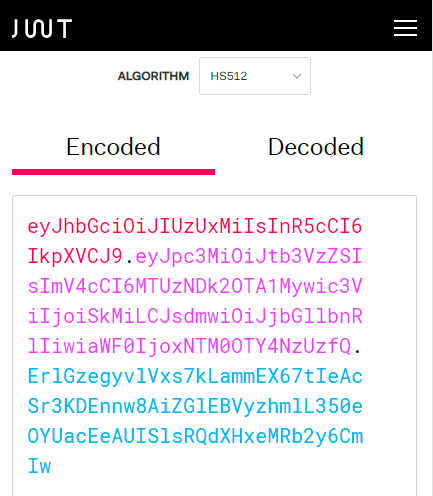
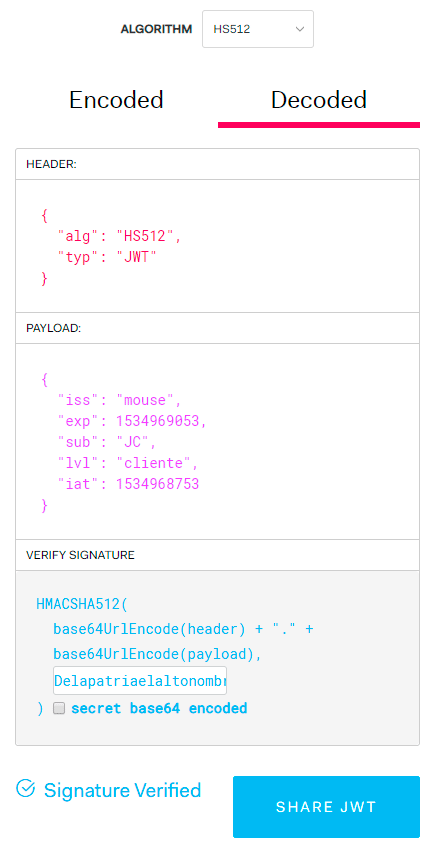
Este código nos genera un Token el cual podemos verificar con esta herramienta online https://jwt.io/
JSON Web Token:
Verificación:
enjoy!!!

Hasta este momento utilizamos un solo Activity para desarrollar nuestras aplicaciones, sin embargo es común que las apli[...]

El juego de las tragamonedas o tragaperras es un juego muy popular de azar que se puede encontrar tanto en los casinos o[...]
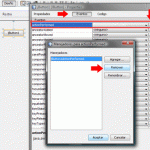
Cuando programamos visualmente desde Netbeans, el IDE nos ayuda mucho al generar rapidamente código predefinido, sin emb[...]
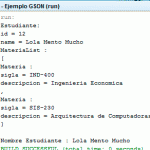
En un post anterior vimos como utilizar GSON para serializar un objeto java en JSON, en esta oportunidad se vera el proc[...]

Online Flag Waver es una páginas web con la que podemos generar banderas ondeando con la textura que elijamos ya sea des[...]

Sans Forgetica es una fuente diseñada utilizando los principios de la psicología cognitiva para ayudar a recordar mejor[...]

