


Inspeccionando los cientos de marcadores que tenia en mi firefox, me encontre un enlace web con una interesante clase para el reconocimiento facial, no recuerdo cuando lo agregue a mis marcadores, bueno eso no importa, pero ahora aprovecho y lo posteo para quienes no lo conocian.
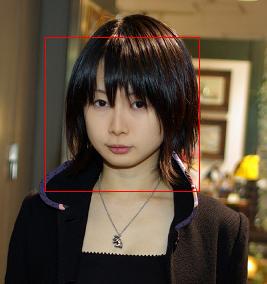
La clase se llama Face_Detector y su autor es un frances (creo?) Maurice Svay su web es https://svay.com/blog/face-detection-in-pure-php-without-opencv/(siempre respetando los derechos de autor). Su implementación es bastante sencilla y lo mejor es que no utiliza librerias ajenas como OPENCV u otros para el reconocimiento facial, según entiendo el autor saco este código de un código en javascript (el enlace ya no esta disponible) y lo migro a puro PHP, ademas esta clase hace uso de un archivo detection.DAT donde estan los patrones de reconociemto facial.
la clase Face_Detector
01 <?php
02 //
03 // This program is free software; you can redistribute it and/or
04 // modify it under the terms of the GNU General Public License
05 // as published by the Free Software Foundation; either version 2
06 // of the License, or (at your option) any later version.
07 //
08 // This program is distributed in the hope that it will be useful,
09 // but WITHOUT ANY WARRANTY; without even the implied warranty of
10 // MERCHANTABILITY or FITNESS FOR A PARTICULAR PURPOSE. See the
11 // GNU General Public License for more details.
12 //
13 // You should have received a copy of the GNU General Public License
14 // along with this program; if not, write to the Free Software
15 // Foundation, Inc., 51 Franklin Street, Fifth Floor, Boston, MA 02110-1301, USA.
16 //
17 // @Author Karthik Tharavaad
18 // karthik_tharavaad@yahoo.com
19 // @Contributor Maurice Svay
20 // maurice@svay.Com
21
22 class Face_Detector {
23
24   protected $detection_data;
25   protected $canvas;
26   protected $face;
27   private $reduced_canvas;
28
29  #El constructor de clase carga el archivo .dat y lo asigna a una variable
30   public function __construct($detection_file = 'detection.dat') {
31     if (is_file($detection_file)) {
32       $this->detection_data = unserialize(file_get_contents($detection_file));
33     } else {
34       throw new Exception("No se pudo cargar el archivo");
35     }
36   }
37
38  #Dado un archivo imagen
39   public function face_detect($file) {
40     if (!is_file($file)) {
41       throw new Exception("No se puede carga el archivo $file");
42     }
43   #crea una nueva imagen temporal
44     $this->canvas = imagecreatefromjpeg($file);
45     $im_width = imagesx($this->canvas);
46     $im_height = imagesy($this->canvas);
47
48     //Resample before detection?
49     $ratio = 0;
50     $diff_width = 320 - $im_width;
51     $diff_height = 240 - $im_height;
52     if ($diff_width > $diff_height) {
53       $ratio = $im_width / 320;
54     } else {
55       $ratio = $im_height / 240;
56     }
57
58     if ($ratio != 0) {
59       $this->reduced_canvas = imagecreatetruecolor($im_width / $ratio, $im_height / $ratio);
60       imagecopyresampled($this->reduced_canvas, $this->canvas, 0, 0, 0, 0, $im_width / $ratio, $im_height / $ratio, $im_width, $im_height);
61
62       $stats = $this->get_img_stats($this->reduced_canvas);
63       $this->face = $this->do_detect_greedy_big_to_small($stats['ii'], $stats['ii2'], $stats['width'], $stats['height']);
64       $this->face['x'] *= $ratio;
65       $this->face['y'] *= $ratio;
66       $this->face['w'] *= $ratio;
67     } else {
68       $stats = $this->get_img_stats($this->canvas);
69       $this->face = $this->do_detect_greedy_big_to_small($stats['ii'], $stats['ii2'], $stats['width'], $stats['height']);
70     }
71     return ($this->face['w'] > 0);
72   }
73
74
75   public function toJpeg() {
76     $color = imagecolorallocate($this->canvas, 255, 0, 0); //red
77     imagerectangle($this->canvas, $this->face['x'], $this->face['y'], $this->face['x']+$this->face['w'], $this->face['y']+ $this->face['w'], $color);
78     header('Content-type: image/jpeg');
79     imagejpeg($this->canvas);
80   }
81  #esto solo para JSON
82   public function toJson() {
83     return "{'x':" . $this->face['x'] . ", 'y':" . $this->face['y'] . ", 'w':" . $this->face['w'] . "}";
84   }
85
86   public function getFace() {
87     return $this->face;
88   }
89
90   protected function get_img_stats($canvas){
91     $image_width = imagesx($canvas);
92     $image_height = imagesy($canvas);
93     $iis = $this->compute_ii($canvas, $image_width, $image_height);
94     return array(
95       'width' => $image_width,
96       'height' => $image_height,
97       'ii' => $iis['ii'],
98       'ii2' => $iis['ii2']
99     );
100   }
101
102   protected function compute_ii($canvas, $image_width, $image_height ){
103     $ii_w = $image_width+1;
104     $ii_h = $image_height+1;
105     $ii = array();
106     $ii2 = array();
107
108     for($i=0; $i<$ii_w; $i++ ){
109       $ii[$i] = 0;
110       $ii2[$i] = 0;
111     }
112
113     for($i=1; $i<$ii_w; $i++ ){
114       $ii[$i*$ii_w] = 0;
115       $ii2[$i*$ii_w] = 0;
116       $rowsum = 0;
117       $rowsum2 = 0;
118       for($j=1; $j<$ii_h; $j++ ){
119         $rgb = ImageColorAt($canvas, $j, $i);
120         $red = ($rgb >> 16) & 0xFF;
121         $green = ($rgb >> 8) & 0xFF;
122         $blue = $rgb & 0xFF;
123         $grey = ( 0.2989*$red + 0.587*$green + 0.114*$blue )>>0; // this is what matlab uses
124         $rowsum += $grey;
125         $rowsum2 += $grey*$grey;
126
127         $ii_above = ($i-1)*$ii_w + $j;
128         $ii_this = $i*$ii_w + $j;
129
130         $ii[$ii_this] = $ii[$ii_above] + $rowsum;
131         $ii2[$ii_this] = $ii2[$ii_above] + $rowsum2;
132       }
133     }
134     return array('ii'=>$ii, 'ii2' => $ii2);
135   }
136
137   protected function do_detect_greedy_big_to_small( $ii, $ii2, $width, $height ){
138     $s_w = $width/20.0;
139     $s_h = $height/20.0;
140     $start_scale = $s_h < $s_w ? $s_h : $s_w;
141     $scale_update = 1 / 1.2;
142     for($scale = $start_scale; $scale > 1; $scale *= $scale_update ){
143       $w = (20*$scale) >> 0;
144       $endx = $width - $w - 1;
145       $endy = $height - $w - 1;
146       $step = max( $scale, 2 ) >> 0;
147       $inv_area = 1 / ($w*$w);
148       for($y = 0; $y < $endy ; $y += $step ){
149         for($x = 0; $x < $endx ; $x += $step ){
150           $passed = $this->detect_on_sub_image( $x, $y, $scale, $ii, $ii2, $w, $width+1, $inv_area);
151           if( $passed ) {
152             return array('x'=>$x, 'y'=>$y, 'w'=>$w);
153           }
154         } // end x
155       } // end y
156     } // end scale
157     return null;
158   }
159
160   protected function detect_on_sub_image( $x, $y, $scale, $ii, $ii2, $w, $iiw, $inv_area){
161     $mean = ( $ii[($y+$w)*$iiw + $x + $w] + $ii[$y*$iiw+$x] - $ii[($y+$w)*$iiw+$x] - $ii[$y*$iiw+$x+$w] )*$inv_area;
162     $vnorm = ( $ii2[($y+$w)*$iiw + $x + $w] + $ii2[$y*$iiw+$x] - $ii2[($y+$w)*$iiw+$x] - $ii2[$y*$iiw+$x+$w] )*$inv_area - ($mean*$mean);
163     $vnorm = $vnorm > 1 ? sqrt($vnorm) : 1;
164
165     $passed = true;
166     for($i_stage = 0; $i_stage < count($this->detection_data); $i_stage++ ){
167       $stage = $this->detection_data[$i_stage];
168       $trees = $stage[0];
169
170       $stage_thresh = $stage[1];
171       $stage_sum = 0;
172
173       for($i_tree = 0; $i_tree < count($trees); $i_tree++ ){
174         $tree = $trees[$i_tree];
175         $current_node = $tree[0];
176         $tree_sum = 0;
177         while( $current_node != null ){
178           $vals = $current_node[0];
179           $node_thresh = $vals[0];
180           $leftval = $vals[1];
181           $rightval = $vals[2];
182           $leftidx = $vals[3];
183           $rightidx = $vals[4];
184           $rects = $current_node[1];
185
186           $rect_sum = 0;
187           for( $i_rect = 0; $i_rect < count($rects); $i_rect++ ){
188             $s = $scale;
189             $rect = $rects[$i_rect];
190             $rx = ($rect[0]*$s+$x)>>0;
191             $ry = ($rect[1]*$s+$y)>>0;
192             $rw = ($rect[2]*$s)>>0;
193             $rh = ($rect[3]*$s)>>0;
194             $wt = $rect[4];
195
196             $r_sum = ( $ii[($ry+$rh)*$iiw + $rx + $rw] + $ii[$ry*$iiw+$rx] - $ii[($ry+$rh)*$iiw+$rx] - $ii[$ry*$iiw+$rx+$rw] )*$wt;
197             $rect_sum += $r_sum;
198           }
199
200           $rect_sum *= $inv_area;
201
202           $current_node = null;
203           if( $rect_sum >= $node_thresh*$vnorm ){
204             if( $rightidx == -1 )
205               $tree_sum = $rightval;
206             else
207               $current_node = $tree[$rightidx];
208           } else {
209             if( $leftidx == -1 )
210               $tree_sum = $leftval;
211             else
212               $current_node = $tree[$leftidx];
213           }
214         }
215         $stage_sum += $tree_sum;
216       }
217       if( $stage_sum < $stage_thresh ){
218         return false;
219       }
220     }
221     return true;
222   }
223 }
Y su implementación:
01 <?php
02  require ('Face_Detector.php');
03     $detector = new Face_Detector('detection.dat');
04     $detector->face_detect('FOTO.jpg');
05     $detector->toJpeg();
06 ?>
Se incluye la clase Face_Detector.php, se crea una instancia especificando el archivo .dat y se hace uso de la función face_detectet(‘archivo imagen’); indicando el archivo de imagen a detetectar. El resultado sera una imagen con un recuadro sobre el rostro, si es que lo detecto, claro nada es perfecto, si le pasamos una foto cualquiera que no incluya un rostro, los resultados podran ser bastantes curiosos.
Bajate los archivos si quieres hacer una prueba desde AQUI


Java2d nos permite manipular imagenes y asi poder crear animaciones sencillas como muestra el siguiente video. Puedes de[...]
Kotlin es un lenguaje de programación de tipado estático que corre sobre la máquina virtual de Java y que también puede[...]
El proyecto «Java Decompiler» tiene como objetivo desarrollar herramientas para descompilar y analizar byte code de jav[...]

Las aplicaciones con IA (Inteligencia Artificial) son cada vez más comunes y se encuentran en diferentes dispositivos de[...]

El procesamiento por lotes (batch processing) en PHP es la ejecución de tareas que implican una gran cantidad de datos u[...]
VLC Media Player es un reproductor multimedia de código abierto muy popular desarrollado por el proyecto VideoLAN. VLCJ [...]

