


Apache POI es la API de Java para el trabajo con archivos de Microsoft como son Word, Excel y Power Point.
Apache POI se encuentra en la versión 3.17 compatible con Java 6. El próximo lanzamiento sera la 4.0.0 y requerirá Java 8 o superior.
Apache POI puede utilizarse descargando su librería desde este enlace (29 MB binarios y 92 MB las fuentes) o usarse Maven para integrarlo al proyecto de la siguiente forma:
<dependency>
    <groupId>org.apache.poi</groupId>
    <artifactId>poi</artifactId>
    <version>3.17</version>
</dependency>
<dependency>
    <groupId>org.apache.poi</groupId>
    <artifactId>poi-ooxml</artifactId>
    <version>3.17</version>
</dependency>
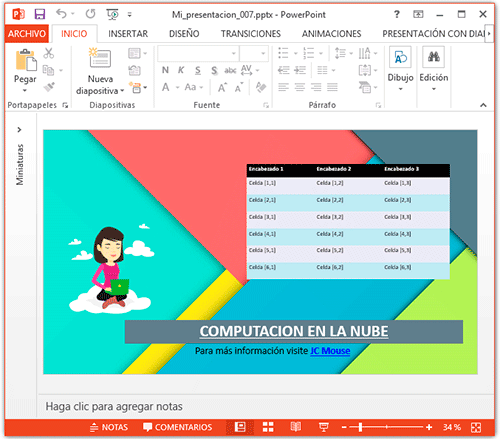
A continuación un sencillo ejemplo pata la creación de un documento Power Point con un slide, texto, imágenes y tabla:
import java.awt.Rectangle;
import java.io.FileInputStream;
import java.io.FileOutputStream;
import java.awt.Color;
import java.awt.Dimension;
import java.io.File;
import java.io.IOException;
import org.apache.poi.sl.usermodel.TextParagraph;
import org.apache.poi.xslf.usermodel.XMLSlideShow;
import org.apache.poi.xslf.usermodel.XSLFSlide;
import org.apache.poi.xslf.usermodel.XSLFTextBox;
import org.apache.poi.xslf.usermodel.XSLFTextParagraph;
import org.apache.poi.xslf.usermodel.XSLFTextRun;
import org.apache.poi.sl.usermodel.PictureData;
import org.apache.poi.util.IOUtils;
import org.apache.poi.xslf.usermodel.XSLFHyperlink;
import org.apache.poi.xslf.usermodel.XSLFPictureData;
import org.apache.poi.xslf.usermodel.XSLFPictureShape;
import org.apache.poi.xslf.usermodel.XSLFTable;
import org.apache.poi.xslf.usermodel.XSLFTableCell;
import org.apache.poi.xslf.usermodel.XSLFTableRow;
/**
 * @see https://www.jc-mouse.net/
 * @author mouse
 */
public class Main {

    public static void main(String[] args) {

        final String presentacion_ppt="Mi_presentacion_007";
        final int ANCHO = 1280;
        final int ALTO = 720;

        try {
            /**
             * Crea nueva presentacion
             */
            XMLSlideShow ppt = new XMLSlideShow();
            ppt.setPageSize(new Dimension(ANCHO,ALTO));

            /**
             * Crea un slide
             */
            XSLFSlide slide1 = ppt.createSlide();

            /**
             * Imagen de fondo
             */
            XSLFPictureData psssssd = ppt.addPicture(new File("e:\\DIRECCION DE TU IMAGEN\\fondoppt.jpg"), PictureData.PictureType.JPEG);
            XSLFPictureShape pictssure = slide1.createPicture(psssssd);
            pictssure.setAnchor(new Rectangle(0, 0, ANCHO, ALTO));

            /**
             * Texto "El Titulo de la presentación"
             */
            XSLFTextBox textBox = slide1.createTextBox();
            textBox.clearText();
            //posicion y dimensiones
            textBox.setAnchor(new Rectangle(240, 560, 1000, 70));
            //color de fondo
            textBox.setFillColor(new Color(105,124,138));
            //parrafo
            XSLFTextParagraph parrafo = textBox.addNewTextParagraph();
            //alineación del texto
            parrafo.setFontAlign(TextParagraph.FontAlign.CENTER);
            parrafo.setTextAlign(TextParagraph.TextAlign.CENTER);
            //texto individual
            XSLFTextRun texto = parrafo.addNewTextRun();
            texto.setText("COMPUTACION EN LA NUBE");
            //estilos
            texto.setUnderlined(true);
            texto.setBold(true);
            texto.setFontColor(Color.WHITE);
            texto.setFontSize(48.);

            /**
             * Texto con Link
             */
            XSLFTextBox textbox2 = slide1.createTextBox();
            textbox2.clearText();
            textbox2.setAnchor(new Rectangle(440, 630, 480, 40));
            XSLFTextParagraph parrafo2 = textbox2.addNewTextParagraph();
            XSLFTextRun texto1 = parrafo2.addNewTextRun();
            texto1.setText("Para más información visite ");
            texto1.setFontSize(30.);
            XSLFTextRun texto2 = parrafo2.addNewTextRun();
            XSLFHyperlink link = texto2.createHyperlink();
            link.setAddress("https://www.jc-mouse.net/");
            texto2.setText("JC Mouse");
            texto2.setBold(true);
            texto2.setFontSize(30.);


            /**
             * Imagen
             */
            byte[] pictureData = IOUtils.toByteArray(new FileInputStream("e:\\DIRECCION DE TU IMAGEN\\cloud.png"));
            XSLFPictureData pd = ppt.addPicture(pictureData, PictureData.PictureType.PNG);
            XSLFPictureShape picture = slide1.createPicture(pd);
            picture.setAnchor(new Rectangle(50, 250, 300, 300));

            /**
             * Tabla
             */
            XSLFTable tabla = slide1.createTable();
            tabla.setAnchor(new Rectangle(600, 100, 460, 320));
            XSLFTextParagraph p = textBox.addNewTextParagraph();
            //encabezado
            int columnas = 3;
            XSLFTableRow fila_encabezado = tabla.addRow();
            fila_encabezado.setHeight(40);
            for (int i = 1; i <= columnas; i++) {
                XSLFTableCell celda_encabezado = fila_encabezado.addCell();
                celda_encabezado.setFillColor(new Color(0,0,0));
                XSLFTextParagraph tp = celda_encabezado.addNewTextParagraph();
                XSLFTextRun tr = tp.addNewTextRun();
                tr.setText("Encabezado " + i);
                tr.setFontColor(new Color(255,255,255));
                tr.setBold(true);
                tabla.setColumnWidth(i-1, 200);
            }
            //contenido
            int filas = 6;
            for (int fila = 1; fila <= filas; fila++) {
                XSLFTableRow tr = tabla.addRow();
                tr.setHeight(50);
                for (int columna = 0; columna < columnas; columna++) {
                    XSLFTableCell celda_contenido = tr.addCell();
                    celda_contenido.setFillColor((fila%2==0)?new Color(202,233,242):new Color(235,233,245));
                    XSLFTextParagraph tp = celda_contenido.addNewTextParagraph();
                    XSLFTextRun trc = tp.addNewTextRun();
                    trc.setText("Celda [" + fila + "," + (columna+1)+"]" );
                }
            }

            /**
             * Guardando archivo PPT
             */
            File file = new File("E:\\DIRECCION PARA GUARDAR ARCHIVO PPTX\\"+presentacion_ppt+".pptx");
            FileOutputStream out = new FileOutputStream(file);
            ppt.write(out);
            System.out.println("Archivo PPT creado");
            out.close();
        } catch (IOException ex) {
            ex.printStackTrace();
        }

    }

}
Y tenemos:
El código fuente completo más los recursos utilizados en este ejemplo los puedes descargar desde este <enlace pobre> (Actualizado 04/01/2026)
enjoy!!!


En un post anterior [Guardar reporte PDF directamente con Jasperreports] vimos una manera de imprimir reportes directame[...]

SQLite. SQLite es un sistema de gestión de bases de datos relacional compatible con ACID, contenida en una relativamente[...]
La internacionalización permite a las aplicaciones adaptarse a los diferentes idiomas y regiones sin necesidad de cambio[...]
Segunda parte del tutorial [Introducción a Scene Builder y MVC (Parte I)]. En esta segunda parte, completaremos el diseñ[...]
En esta ocasión vemos un ejemplo sencillo de como usar Tile Map en nuestros juegos android con la librería LibGDX utiliz[...]

En este post veremos como enviar solicitudes GET y POST a un API RestFul desde un dispositivo con android. Nuestra apli[...]

